Cloudmefy Suite

One platform. The whole industrial process, connected.

Engineering, materials, construction, inspection, quality and tracking in a single system, from start to finish.

Eight applications on one technology platform

You can license one module, several connected applications or the whole suite, including solar construction, and adapt the existing applications to your company’s processes.

Each tab presents an application and, where there is one, its real screen. Across connected applications, what is recorded in one is available in the others without typing it again.

Frame from the demo video

Sector: Any sector

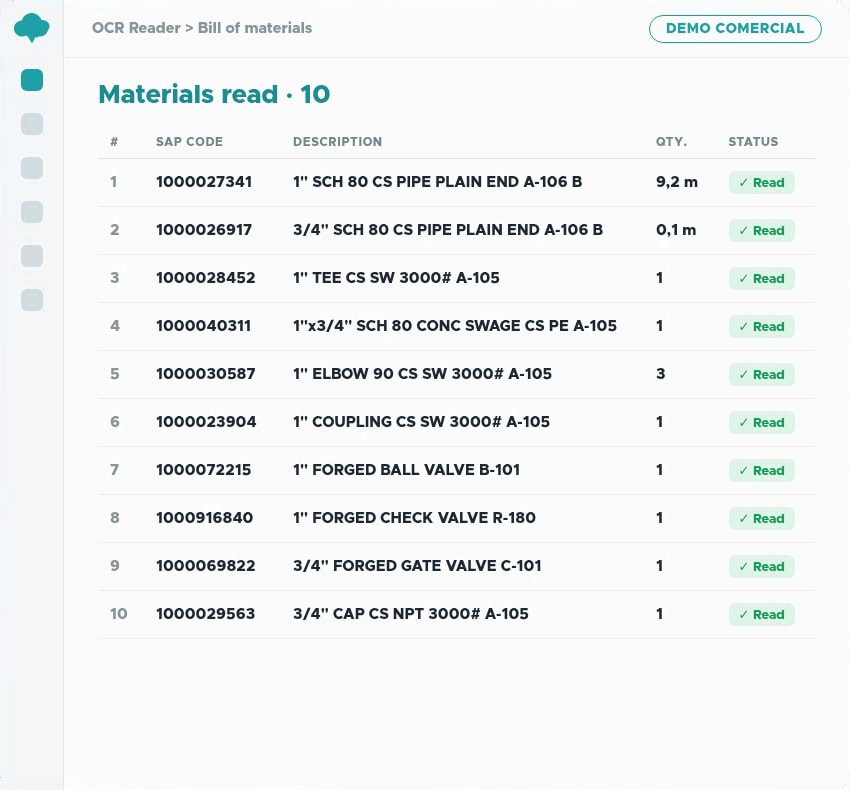
Technical documentation enters the suite without being retyped.

Project drawings and documents are uploaded and their data extracted in minutes, with validation before anything enters the system. Today we use it in refineries. The document extraction technology can also be adapted to other document types, depending on the needs of the project.

  • Less manual transcription of drawings and bills of materials.
  • A person validates the data before it enters the system.
  • It is the way documentation enters the suite.
See all features: OCR
  • Reading and processing of isometric drawings.
  • Extraction of data and bills of materials.
  • Digitisation of engineering data.
  • Fewer manual transcription tasks.
See the module: OCR

Frame from the demo video
Watch it in motion

Sector: Refining and petrochemicals

From an isometric drawing to full control of construction.

We digitise the piping construction process, connecting engineering, materials, fabrication, erection, welding and quality on a single platform.

  • Five submodules: isometrics, materials, spooling, spool tracking and welding book.
  • Material is allocated by priority before work starts.
  • Every spool and every weld, with its status in plain sight.
  • Traceability is ready for the quality dossier.
See all features: Piping

Isometric drawings and revisions TU-ISO

  • Isometrics loaded from the OCR module.
  • Control of the current revision of each isometric.
  • Comparison between revisions, with the material changes between them.
  • Work carries on while the client reviews; it only stops if they reject.

Materials TU-MAT

  • Recording and checking of materials received.
  • Material identification and tracking of shortages.
  • Automatic allocation of material by construction priority.
  • Control of availability for carrying out the work.

Spooling TU-TRA

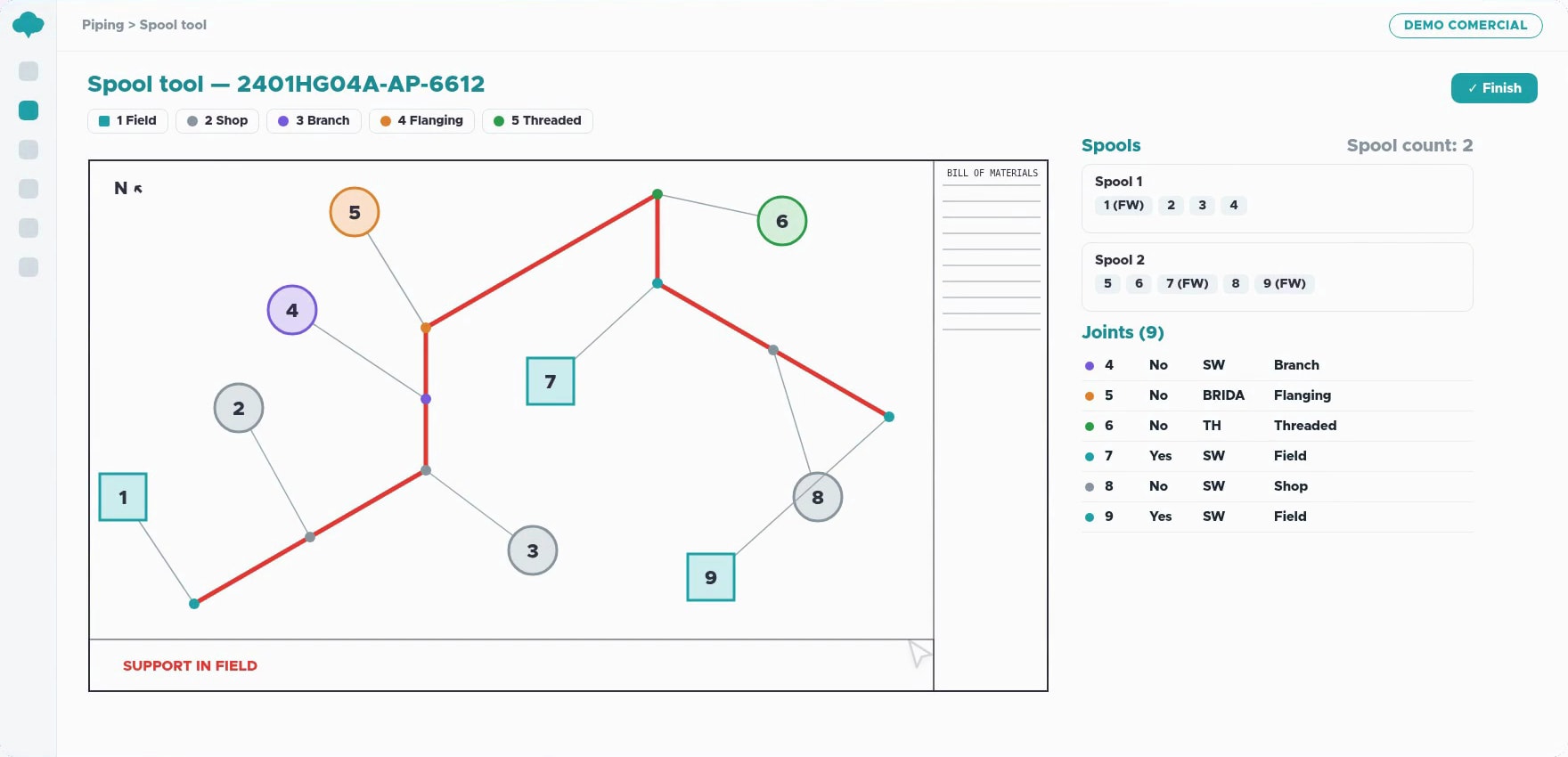
  • Visual representation of isometrics.
  • Identification of spools, joints and construction elements.
  • Work organised directly on the drawing.
  • Linear metres calculated from the drawing.

Spool tracking TU-TRM

  • Individual tracking of each spool.
  • Route of each spool through the workshop, painting and erection.
  • Identification of pending and completed work.
  • Visibility of progress.

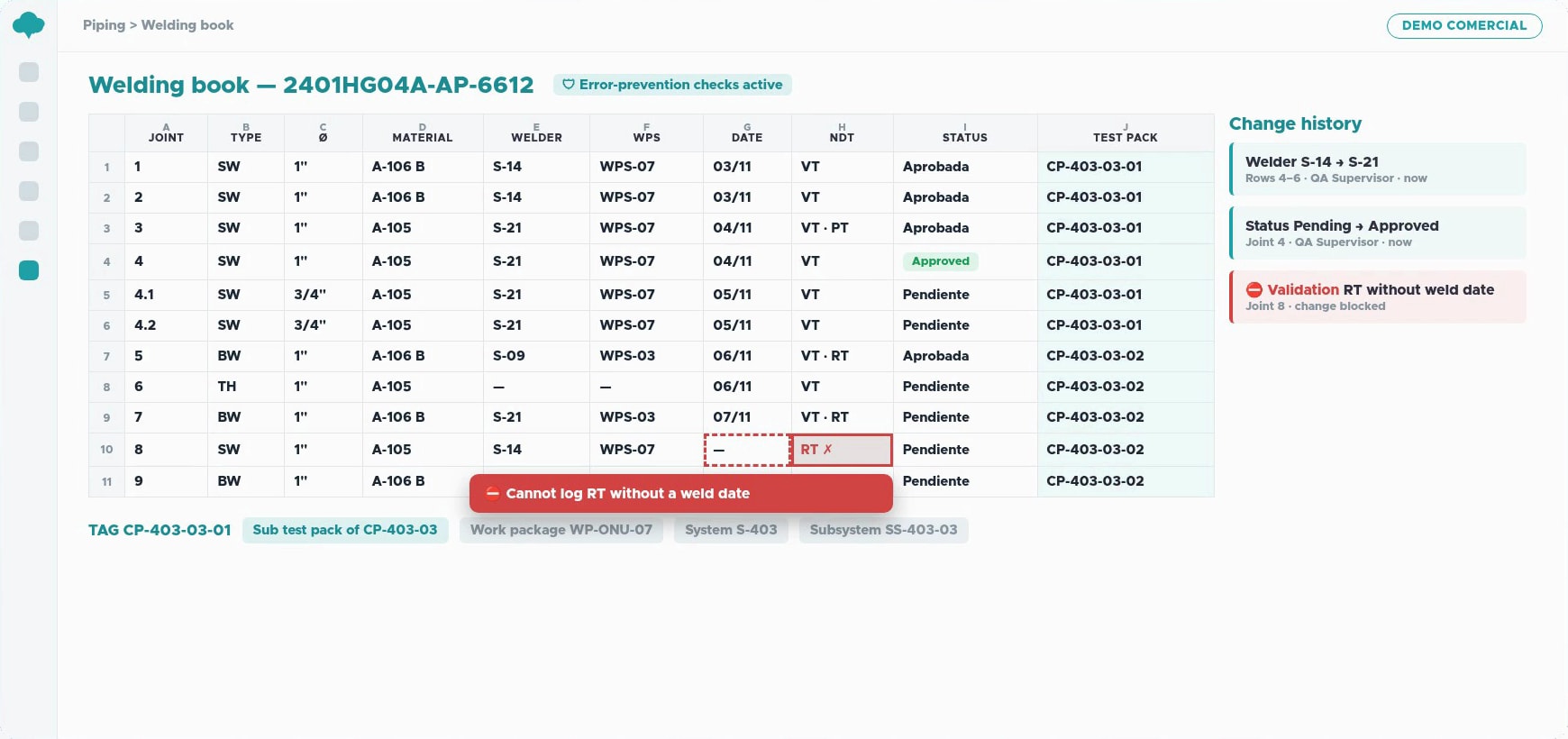
Welding book TU-WBK

  • Digital management of welds.
  • Tracking of statuses, validations and change history.
  • Traceability of the operations carried out.
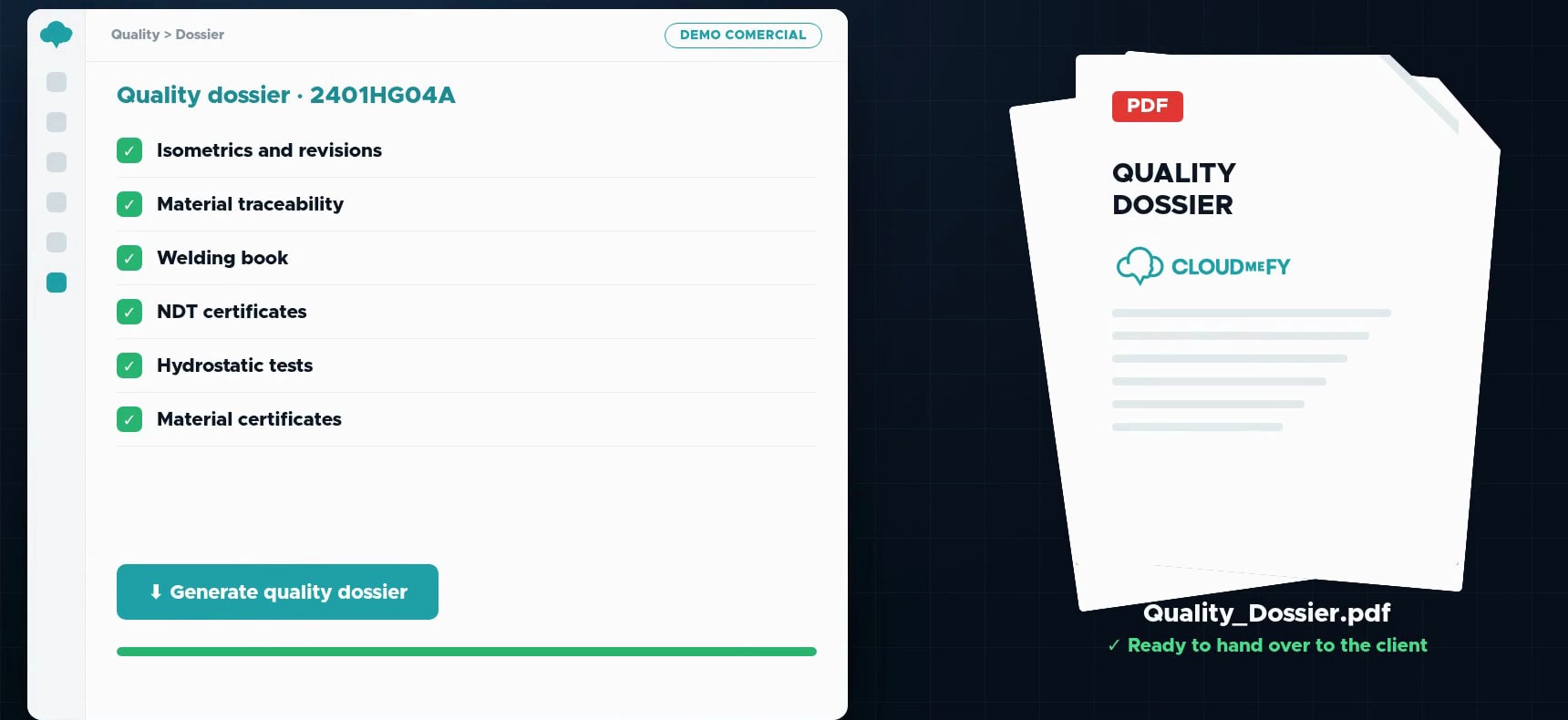
  • The quality dossier is exported from the welding book.

See the module: Piping

Frame from the demo video
Watch it in motion

Sector: Refining and petrochemicals

Every circuit, every test and every validation under control.

Manage mechanical completion, inspection and testing through digital workflows, centralised information and traceability.

  • Contractor and supervisor work on the same record.
  • No circuit moves to the next phase without approval.
  • Dates and results of every test, stored with the circuit.
See all features: Circuits
  • Hierarchical organisation of circuits and subcircuits.
  • Linking and tracking of equipment.
  • Approval workflows between contractors and supervisors.
  • Management of inspection and test protocols (PIP).
  • Mechanical completion.
  • Hydrostatic tests.
  • Flushing, drying and return to service.
  • Approval and validation statuses.
  • Recording of dates and results.
  • Tracking of open activities.

See the module: Circuits

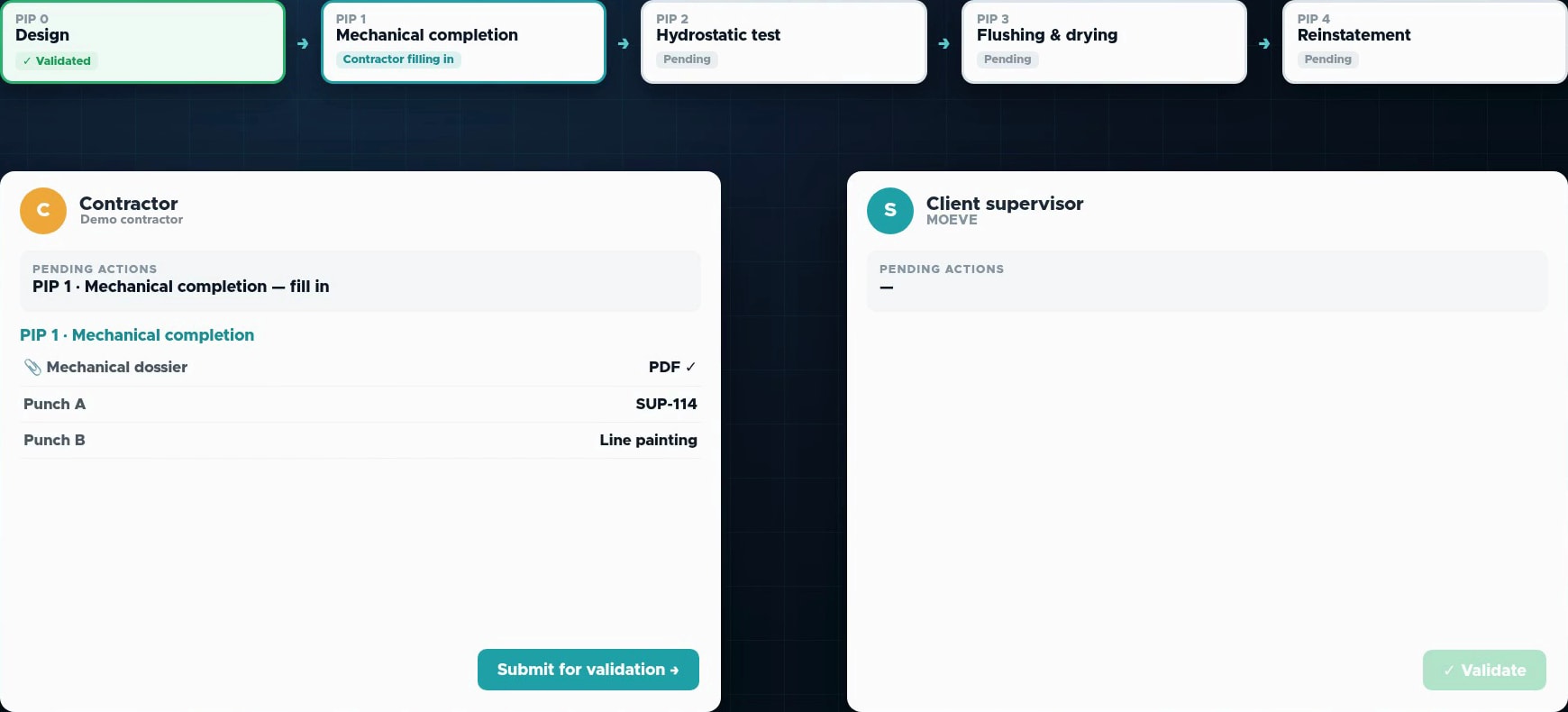
  1. Set up the protocol Sequence and responsibilities
  2. Contractor carries it out Record of the work done
  3. Supervisor validates If rejected, back to review
  4. Next step Only once approved
Each protocol with its sequence, the person responsible for carrying it out and its validation. Without approval, it does not move on.

Sector: Refining and petrochemicals

The same control for every other discipline.

Pumps, instrumentation, electrical and whatever else is needed: each protocol with its sequence, the person responsible for carrying it out and its validation.

  • Contractor and supervisor work on the same record.
  • No protocol moves to the next step without approval.
  • Every protocol keeps its validation history.
See all features: Protocols
  • Protocol set-up by discipline.
  • Sequence of steps for each protocol.
  • Person responsible for carrying it out and for validating it.
  • Approval workflows between contractors and supervisors.
  • Return for review when the supervisor rejects.
  • Recording of dates and results.

See the module: Protocols

  1. Request Element to be tested
  2. Performance Magnetic particle, radiography and others
  3. Result Recorded with the element
  4. Validation Result validated
Who requests the test, who performs it and who validates the result, with the record linked to the element tested.

Sector: Refining and petrochemicals

Every test, linked to the element tested.

Magnetic particle testing, radiography and all other non-destructive tests: who requests them, who performs them and who validates the result.

  • The record of each test is linked to the element tested.
  • Request, performance and validation in the same workflow.
  • The status of each test, visible to contractor and supervisor.
See all features: NDT
  • Test requests.
  • Magnetic particle testing, radiography and other non-destructive tests.
  • Recording of the work performed.
  • Result linked to the element tested.
  • Validation of the result.

See the module: NDT

Screenshot of the application
Watch it in motion

Sector: Refining and petrochemicals

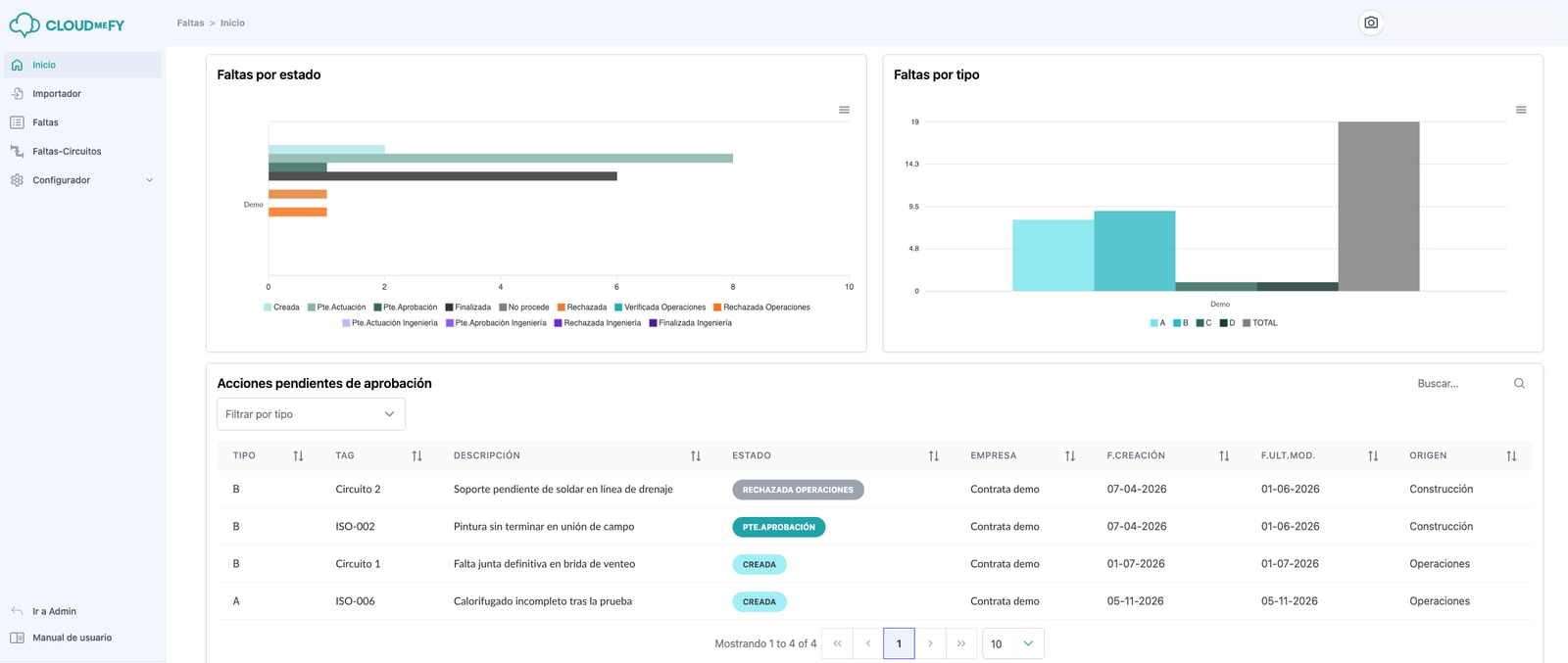
Every issue located. Every open item tracked.

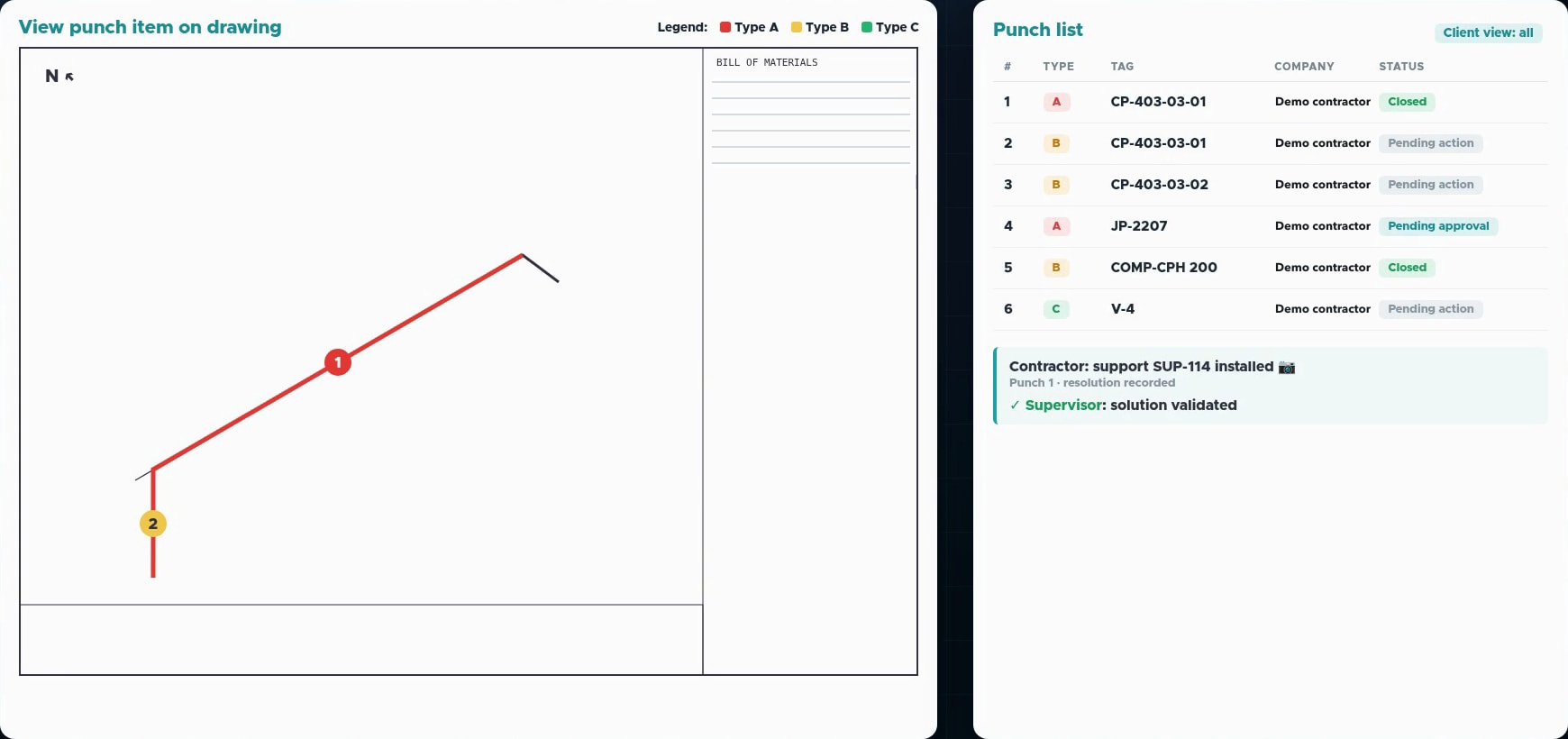
Bring construction issues together, link them to circuits and see them directly on the drawings.

  • Every punch item, placed on the drawing and linked to its circuit.
  • An open punch item can stop the circuit from moving to the next phase.
  • Contractors, supervisors and project managers see the same list.
See all features: Punch list
  • Recording and classification of punch items.
  • Identification of issues on the drawings.
  • Links to circuits and equipment.
  • Status tracking for each punch item.
  • Control of items awaiting resolution.
  • Validation of resolved issues.
  • Relationship between punch items and circuit readiness for testing.
  • Visibility for contractors, supervisors and project managers.

See the module: Punch list

Screenshot of the application

Sector: All kinds of plants

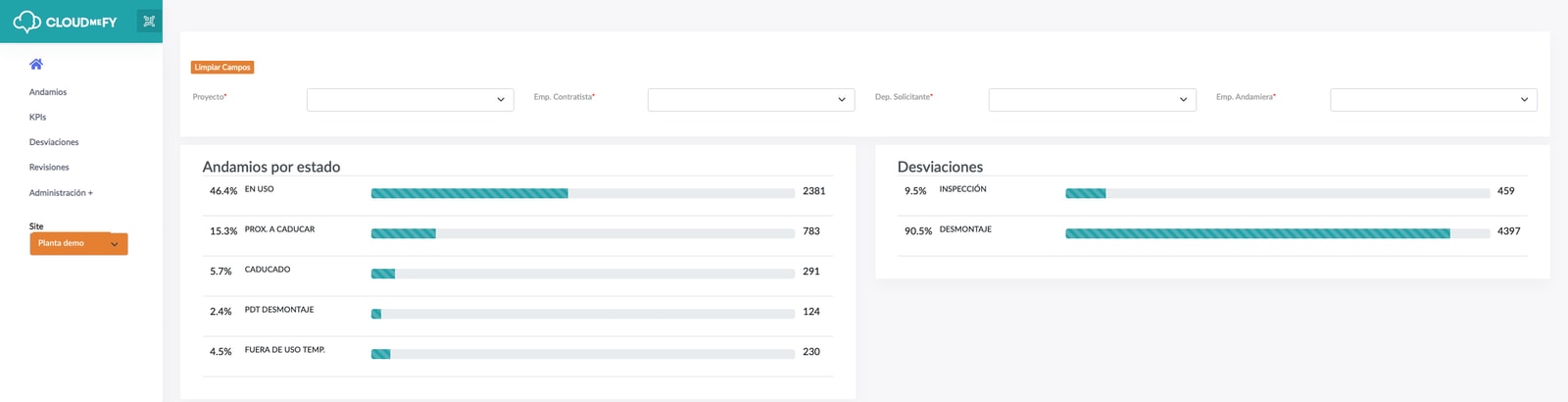
Complete scaffold control, from request to dismantling.

Each scaffold recorded only once, with its inspections under control and its status visible at the plant via a QR code. For construction, maintenance and turnarounds at any plant that works with scaffolding.

  • Every inspection is recorded with date, author and location.
  • Alerts before each due date and a daily summary as a work plan.
  • Cost forecasts for the client and valuation forecasts for the contractor.
See all features: Scaffolding
  • Request with dimensions, m³, purpose, area, dates and initial checklist.
  • Single record with the contractor’s ERP code, via API or Excel/CSV.
  • Geolocated erection photo and field validation.
  • Tag on the scaffold with QR and a public data sheet for anyone at the plant.
  • Inspections according to the type of scaffold, with alerts and expiry.
  • Satellite map by status, dismantling with deadlines and cost calculation.

See the module: Scaffolding

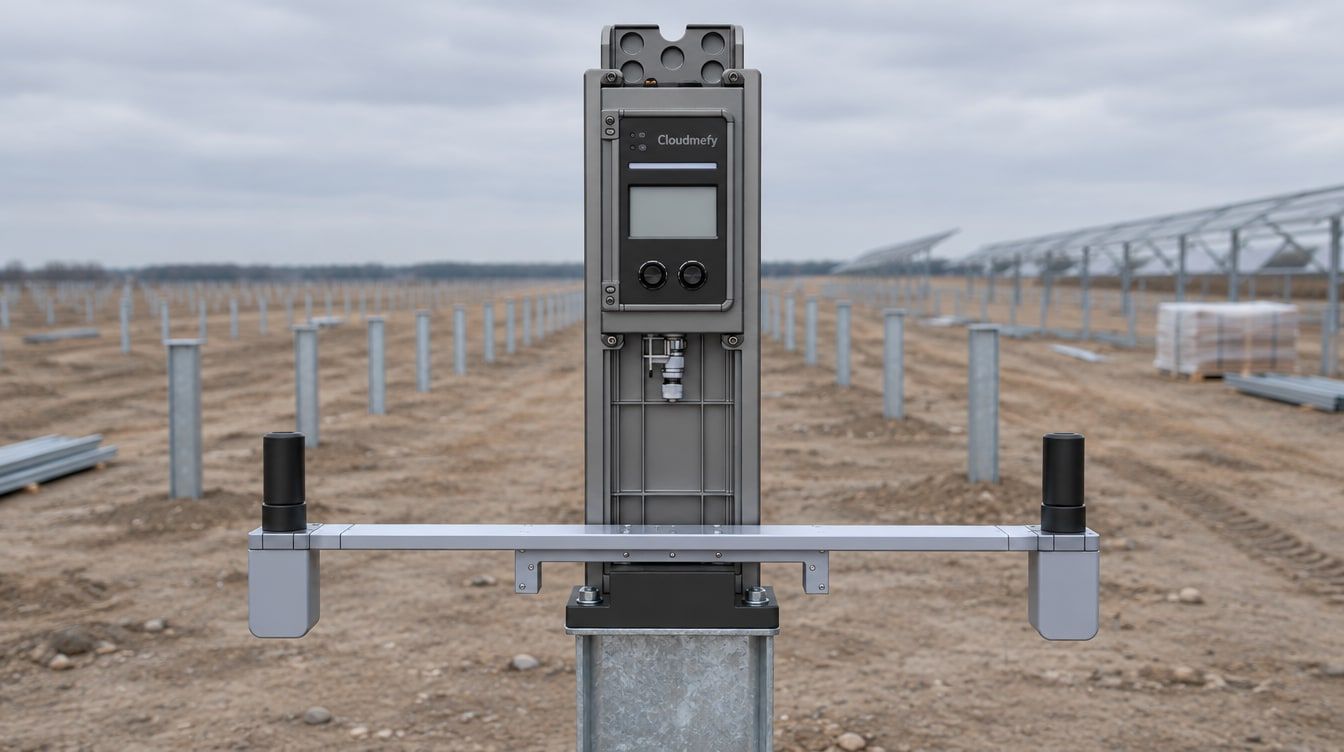
Measuring device placed on a driven pile at a solar plant under construction
Illustrative image

Sector: Energy · Solar plants

Construction control for solar plants.

The operator places our IoT device on each pile and the data reaches the platform by itself: progress, tolerances, inspections and installation traceability.

  • Every day you know how many piles have been driven and how they turned out.
  • Tolerance is verified against the design at the moment the pile is driven.
  • Torque tubes, modules, cabling and motors progress through checklists and approvals that require a photograph.
  • How each pile was left is on record for maintenance inspections.
See all features: Solar
  • Measurement of each pile with our device: inclination on both axes, twist, head height above ground and distance between piles by laser.
  • The data goes straight into the application, with no field sheet and no Excel.
  • Pile driving progress for each day.
  • Tolerance checked against the design when the pile is driven.
  • Checklists and approval workflows with a photograph for torque tubes, modules, cabling and motors.
  • A record of how each pile was left, to compare against in maintenance inspections.

See the module: Solar

Cloudmefy Suite also includes the solar construction application, with our IoT device.

See solar construction

From drawing to dossier, without switching tools

The isometric that comes in through OCR is the same one that is spooled, welded, tested and handed over. Each stage starts from what the previous one recorded.

  1. Engineering Isometrics read by OCR
  2. Materials Receipt and allocation
  3. Construction Spooling, spools and welds
  4. Inspection Protocols, tests and punch items
  5. Validation Supervisor approval
  6. Final dossier Handover documentation in PDF
Each stage builds on what the previous one recorded

Visual pipe spooling

Spools and joints are marked on the isometric itself. The workshop works from the drawing, not from a separate sheet.

Frame from the demo video

Circuits and punch items on the drawing

Each punch item is placed on the drawing and linked to its circuit. While it stays open, the circuit may not be released for testing.

Frame from the demo video
SU-MOD

A single model of the installation

Before any module is opened, the installation is registered just once: projects, elements, circuits and subcircuits, with the isometrics linked to each one. Every element has its own unique identifier, and it is the same in every module.

That means a circuit is the same circuit in the hydrostatic test, in the protocol, in the test record and in the punch list. It is not registered six times or named in six different ways. When something changes, it changes once.

Each user logs in and sees the modules they have access to. The registration and structure of the installation are controlled by whoever is meant to control them.

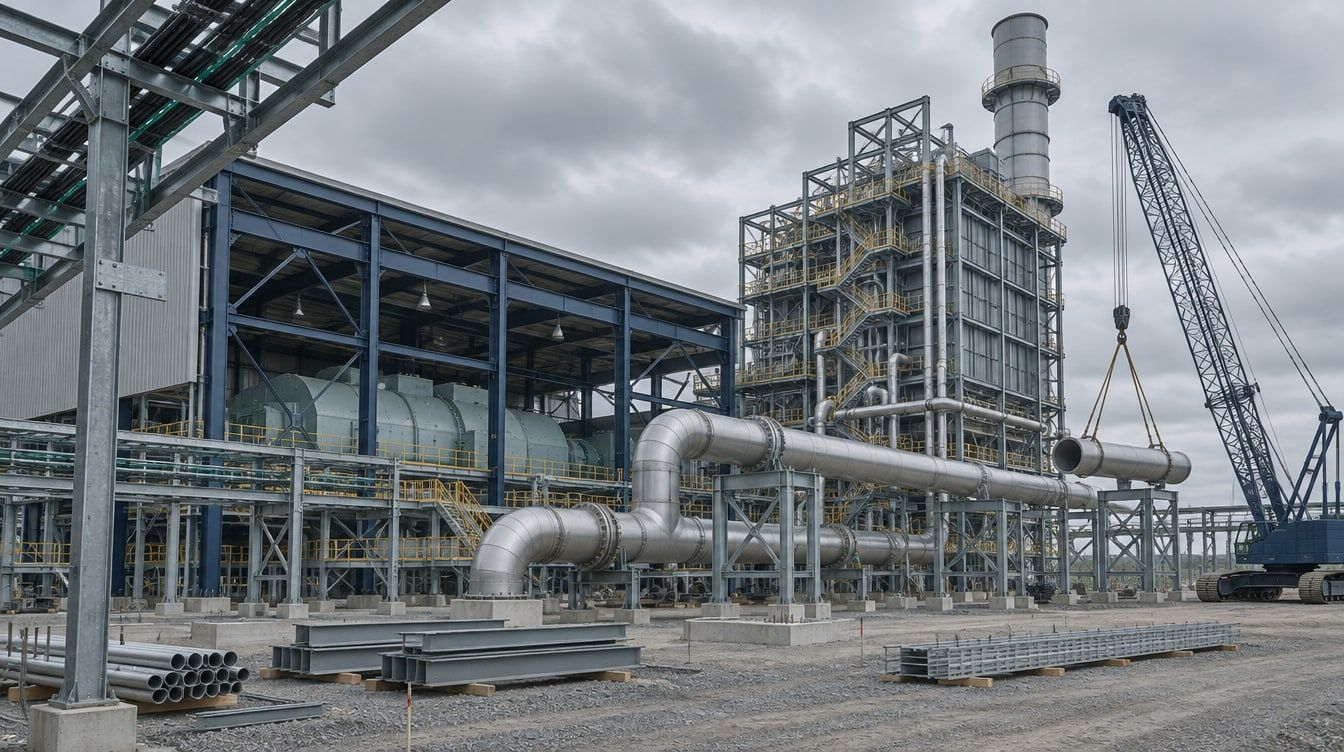
Combined-cycle power plant under construction, with steel structure, steam piping and a crane
Illustrative image

Features common to every module

They are not separate modules: they come with the application and work the same way in all eight applications.

  • Approval workflows. The contractor records the work done and the supervisor validates it. Without approval, nothing moves on.
  • QR codes and export. Elements are identified by their QR code and lists can be exported.
  • Daily follow-up and notifications. Open tasks, activity summaries and progress indicators, with reports and notifications without preparing separate spreadsheets.
  • Quality dossier. What is recorded during execution comes together in the handover documentation, which is generated and exported as a PDF from the welding book.
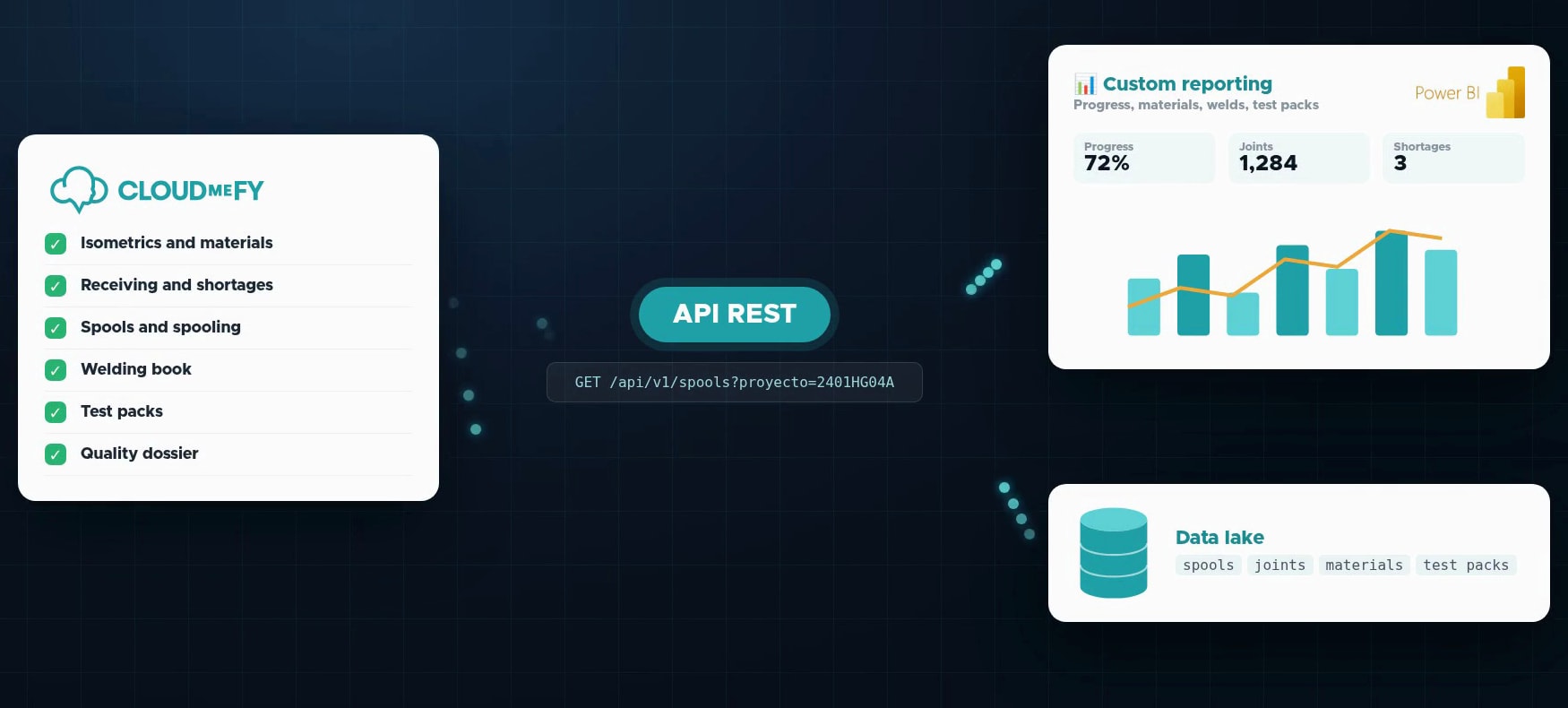
  • REST API. Data flows through a REST API to reporting and analytics tools such as Power BI.
Frame from the demo video

All modules

Each module is licensed separately and they all work on the same model of the installation.

OCR - Technical document reading

Project drawings and documents are uploaded and their data extracted in minutes, with validation before anything enters the system.

It is the way documentation enters the suite.

View module: OCR - Technical document reading

Piping

Five submodules: isometric drawings and revisions, materials, spooling, spool tracking and welding book, from which the quality dossier is exported.

View module: Piping

SU-CIR Related

Circuits

Step-by-step control of hydrostatic tests.

The contractor records the work done in each test protocol and the supervisor validates it. If the supervisor rejects it, it goes back for review; if they approve it, the circuit moves on to the next step. The status of every circuit is visible at all times, not sitting in someone’s folder.

View module: Circuits

SU-PRO Related

Protocols

The same control for every other discipline: pumps, instrumentation, electrical and whatever else is needed.

Each protocol with its sequence, the person responsible for carrying it out and its validation.

View module: Protocols

SU-END Related

Non-destructive testing

Magnetic particle testing, radiography and all other tests.

Who requests them, who performs them and who validates the result, with the record linked to the element tested.

View module: Non-destructive testing

Punch list

Every open item detected in any module, in a single list, with its resolution status.

View module: Punch list

SU-AND Related

Scaffolding

Scaffold control from request to dismantling.

Request, single record, geolocated photo and validation, tag with QR, inspections with alerts, status map, dismantling and cost forecasts for the client and the contractor.

View module: Scaffolding

SU-FOT Related

Solar construction

The operator places our IoT device on each pile and the data reaches the platform by itself.

Progress, tolerances, inspections and installation traceability for solar plants. Torque tubes, modules, cabling and motors progress through checklists and approval workflows that require a photograph.

View module: Solar construction

How it is licensed

Cloudmefy Suite is software as a service. The application is developed and in operation: configuration screens, lists, editable master data, QR codes, export and approval workflows. We host and maintain it, on a dedicated instance for each client. You pay an annual licence per module, and only for the modules you use.

Every business works in its own way, whether it is a steelworks, a chemical plant, a power company or a refinery. If your process needs something different, we adapt it: the adaptation is defined and quoted for each case, and done once on a base that is already built and proven. After that you keep the licence for our application, and we take care of hosting and maintenance, as agreed in your contract.

You are not buying a development project or maintaining bespoke software. You start with something that works from day one and adjust it to your process, instead of waiting months for someone to program it.

Interior of a chemical plant with stainless steel vessels and pipework
Illustrative image